How to Translate JPG Images
Learn how to translate JPG images while preserving layout, fonts, and design integrity using AI-powered tools and modern localization workflows.

Contributors

Subscribe to our newsletter
Introduction
The first time I tried translating a JPG banner for a global campaign, I thought it would be simple. I had the image. I had the translated copy. What could possibly go wrong?
Well… everything.
The text was baked into the image. There were no editable layers. The font didn’t support special characters. And suddenly what seemed like a 10-minute task turned into a full redesign project.
That’s when I realized translating images isn’t just about language — it’s about workflow, structure, and strategy.
Over the years, image localization has evolved dramatically. In the early days of digital marketing, translating a JPG meant recreating the entire design in Photoshop or Illustrator. Painful, slow, and impossible to scale.
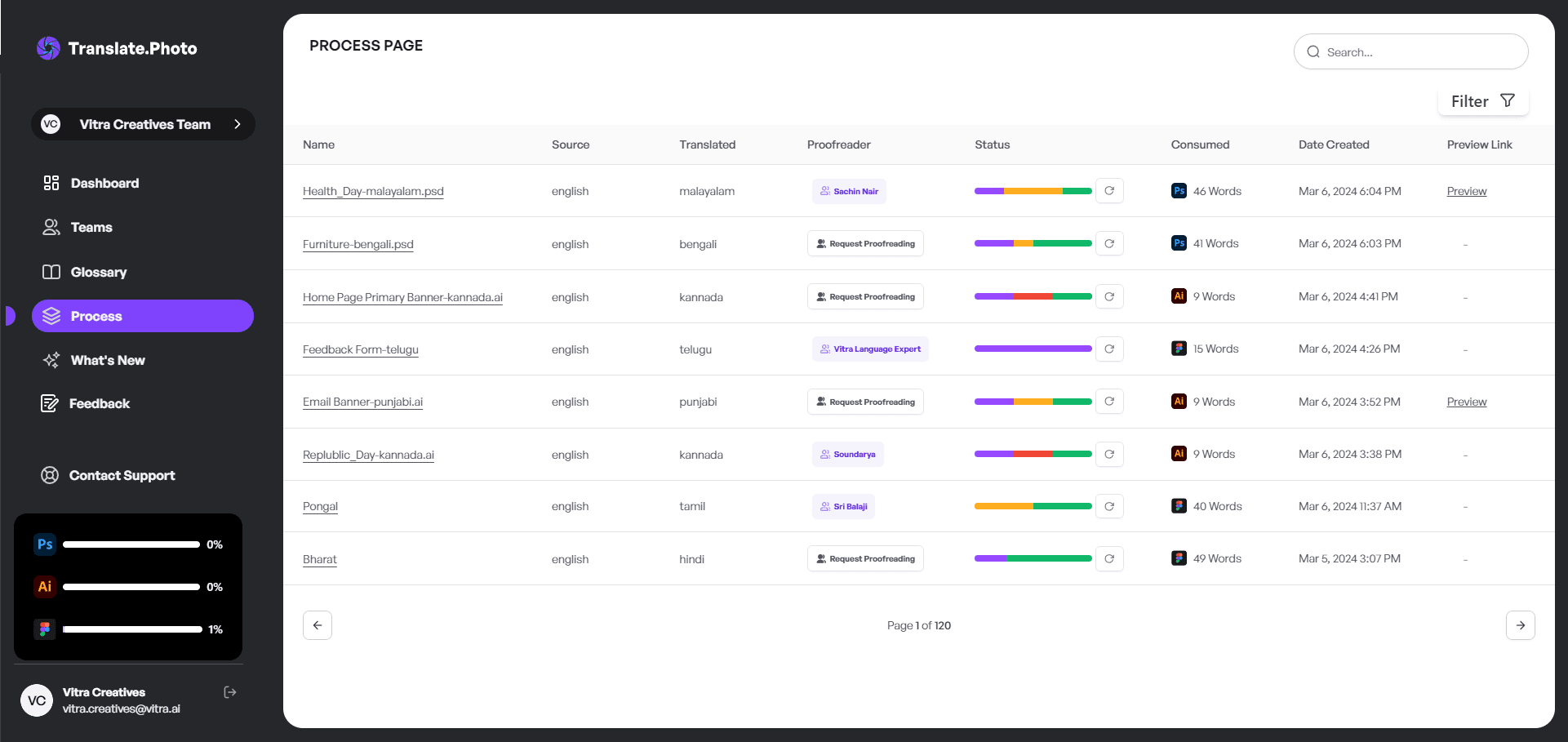
Today, AI-powered platforms like Translate.photo can detect, translate, and replace text inside JPG images within minutes while maintaining the original design layout.
When we talk about how to translate JPG images, we are really talking about preserving layout, fonts, brand voice, and cultural nuance without breaking creative workflows.
How to Translate JPG Images
When someone asks me, “How do I translate a JPG without redesigning it from scratch?” my answer is simple:
You don’t redesign.
You automate intelligently.
The process typically involves three steps:
- Extract text from the image using OCR
- Translate the text using AI or human review
- Replace the original text while preserving layout
With the right tools, this workflow becomes fast and scalable.
What Makes JPG Images Difficult to Translate?
JPG files are raster images, meaning the text inside them is not editable.
Instead, the text is flattened into pixels.
This creates several challenges:
- No editable text layers
- Fonts cannot be directly modified
- Text often overlaps graphics
- Layout shifts when translations become longer
For example, German text often expands significantly compared to English, which can break carefully balanced designs.
The Evolution of JPG Image Translation
Manual Era
Previously, translating JPG creatives meant:
- Opening the image in Photoshop
- Erasing the existing text
- Typing translated copy manually
- Fixing alignment and spacing
While effective, this process was extremely slow.
AI-Powered Era
Modern tools like Translate.photo simplify the workflow by allowing you to:
- Automatically detect text in images
- Translate content into 75+ languages
- Preserve layout and structure
- Export localized creatives instantly
Once teams experience this level of automation, going back to manual editing feels outdated.
Step-by-Step Guide: How to Translate JPG Images
Step 1: Upload the JPG
Upload your creative into a translation platform such as Translate.photo.
No plugins or complicated setup required.
Step 2: Automatic Text Detection
The system scans the image and identifies text blocks using OCR.
Step 3: Select Target Language
Choose the language you want to translate into.
Step 4: AI Translation
The system translates the detected text while maintaining layout alignment.
Step 5: Review and Edit
Even the best automation benefits from a quick human review to ensure tone and context are correct.
How to Translate JPG Images Without Breaking Layout
Maintaining layout integrity is critical when translating images.
I always check the following:
- Text expansion ratios
- Font compatibility
- Alignment consistency
- Color contrast and readability
Below is a quick reference for language expansion.
| Language | Average Text Expansion |
|---|---|
| Spanish | +15% |
| German | +30% |
| French | +20% |
| Japanese | -10% |
Understanding these differences helps prevent layout problems.
Real-World Example
Original English banner:
Limited Time Offer – Shop Now
Spanish translation:
Oferta por Tiempo Limitado – Compra Ahora
Notice how the translated version is longer.
Design flexibility becomes essential when adapting visuals across languages.
Benefits of Learning How to Translate JPG Images
Adopting a modern workflow provides several advantages:
- Faster campaign launches
- Lower design costs
- Higher localization quality
- Consistent brand messaging
- Improved engagement in global markets
Localized visuals often perform better because audiences connect more easily with content in their own language.
Who Needs JPG Image Translation?
Any organization marketing globally can benefit from translating visual assets.
Examples include:
- E-commerce brands
- SaaS companies
- FinTech startups
- Travel businesses
- FMCG companies
If your campaigns reach multiple countries, localized visuals become essential.
How to Translate JPG Images at Scale
When translating dozens or hundreds of creatives, manual workflows quickly become inefficient.
Scalable localization workflows typically include:
- Bulk image upload
- Batch translation
- Centralized glossaries
- Fast export options
This allows teams to localize large campaigns quickly.
Common Mistakes to Avoid
Here are some common issues teams encounter:
- Literal translations that ignore context
- Overlooking cultural nuance
- Forgetting right-to-left alignment for languages like Arabic
- Ignoring mobile readability
Avoiding these mistakes improves both design quality and campaign performance.
Translate.photo Workflow Breakdown
| Step | Action | Time Required |
|---|---|---|
| Upload | Add JPG file | 10 seconds |
| Detect | OCR scanning | 15 seconds |
| Translate | Select language | 20 seconds |
| Review | Manual check | 1–2 minutes |
| Export | Download final file | 10 seconds |
This means a typical creative can be localized in under three minutes.
How to Translate JPG Images for Social Media
Social media campaigns require speed and consistency.
A typical workflow includes:
- Translating the master creative
- Resizing for multiple platforms
- Exporting platform-specific formats
- Maintaining brand tone across languages
This ensures campaigns remain visually consistent across global audiences.
Maintaining Brand Voice Across Languages
Consistency matters when translating marketing visuals.
Translation memory and glossaries help preserve:
- Product names
- Brand taglines
- Key terminology
- Industry-specific vocabulary
This prevents messaging inconsistencies across markets.
How to Translate JPG Images with Multiple Fonts
Fonts can cause unexpected issues when translating images.
Before exporting localized creatives, always check:
- Unicode compatibility
- Script rendering
- Diacritic support
Missing characters or broken fonts can damage the overall design.
Frequently Asked Questions
Can I translate JPG images for free?
Yes, but many free tools struggle with formatting and layout preservation.
Is AI translation accurate?
Modern AI translation is highly accurate, but human review is still recommended for brand tone.
Does layout stay intact?
Advanced platforms like Translate.photo help maintain visual layout and alignment.
Comparing Translation Methods
| Method | Speed | Design Preservation | Scalability |
|---|---|---|---|
| Manual Editing | Slow | Medium | Low |
| Basic OCR Tool | Medium | Low | Medium |
| Translate.photo | Fast | High | High |
For large campaigns, automation becomes the most practical approach.
Advanced Tips for Translating JPG Images
Some best practices I always follow include:
- Keeping text boxes flexible
- Avoiding overly tight layouts
- Testing long-language scenarios
- Using glossary controls
- Reviewing cultural nuance
These adjustments significantly improve localization quality.
How to Translate JPG Images for Global Campaigns
For international campaigns, I standardize several elements:
- Tone guides
- Brand glossaries
- Layout grids
- Spacing margins
This ensures every localized creative feels native to its audience.
How to Translate JPG Images Efficiently
Efficiency is not just about speed.
It is about reducing friction in the creative workflow.
Automation removes repetitive tasks and allows marketers and designers to focus on strategy rather than manual editing.
How to Translate JPG Images the Smart Way
At its core, translating JPG images is more than a technical process.
It is a branding responsibility.
Successful localization respects language, preserves design quality, and ensures messaging resonates across cultures.
With modern AI tools, image localization becomes scalable, accurate, and far more efficient than traditional workflows.
Our blog
Lastest blog posts
Tool and strategies modern teams need to help their companies grow.

Image optimization
Balancing Image Quality and Load Speed for Portfolio Links
Learn how to balance high image quality and fast load speed for portfolio websites using smart compression, responsive images, and performance optimization techniques.

Image-optimization
How to Change Image Dimensions Without 'Squishing' Your Subject
Learn how to change image dimensions without distorting your subject by using proportional scaling, smart cropping, and canvas expansion techniques.

Image translation
How to Translate JPEG Images
Learn how to translate JPEG images accurately while preserving layout, brand tone, and design quality with a smarter AI-powered workflow.
Join Our Satisfied Clientele
- Global Reach, Local Impact
- Efficiency Redefined
- Optimized SEO, Elevated Traffic